
Spa & Beauty Operations
Spa Appointment Rescheduling: How to Handle Changes Without Customer Confusion
Customers need to change a spa appointment? Learn how to handle requests, explain booking status and avoid conflicting replies across staff and branches.

Reply.my Editorial Team
Practical guidance reviewed for clear implementation steps, responsible AI boundaries and honest claims. How we prepare our guides.
“Can I move tomorrow’s appointment to Friday?”
Reception replies, “Sure, we’ll check.” The customer assumes the change is arranged. Another employee sees the original booking and sends a reminder for tomorrow.
Now the customer is asking which message to trust.
Spa appointment rescheduling is not just a calendar task. It is a conversation in which the customer and your team need to agree on what has changed, what remains pending and which appointment is actually confirmed.
For a beauty centre with several receptionists or branches, that clarity matters more than sending a quick acknowledgement. A useful reply should not leave the customer guessing whether to attend the original appointment.
The distinction that prevents most of the confusion
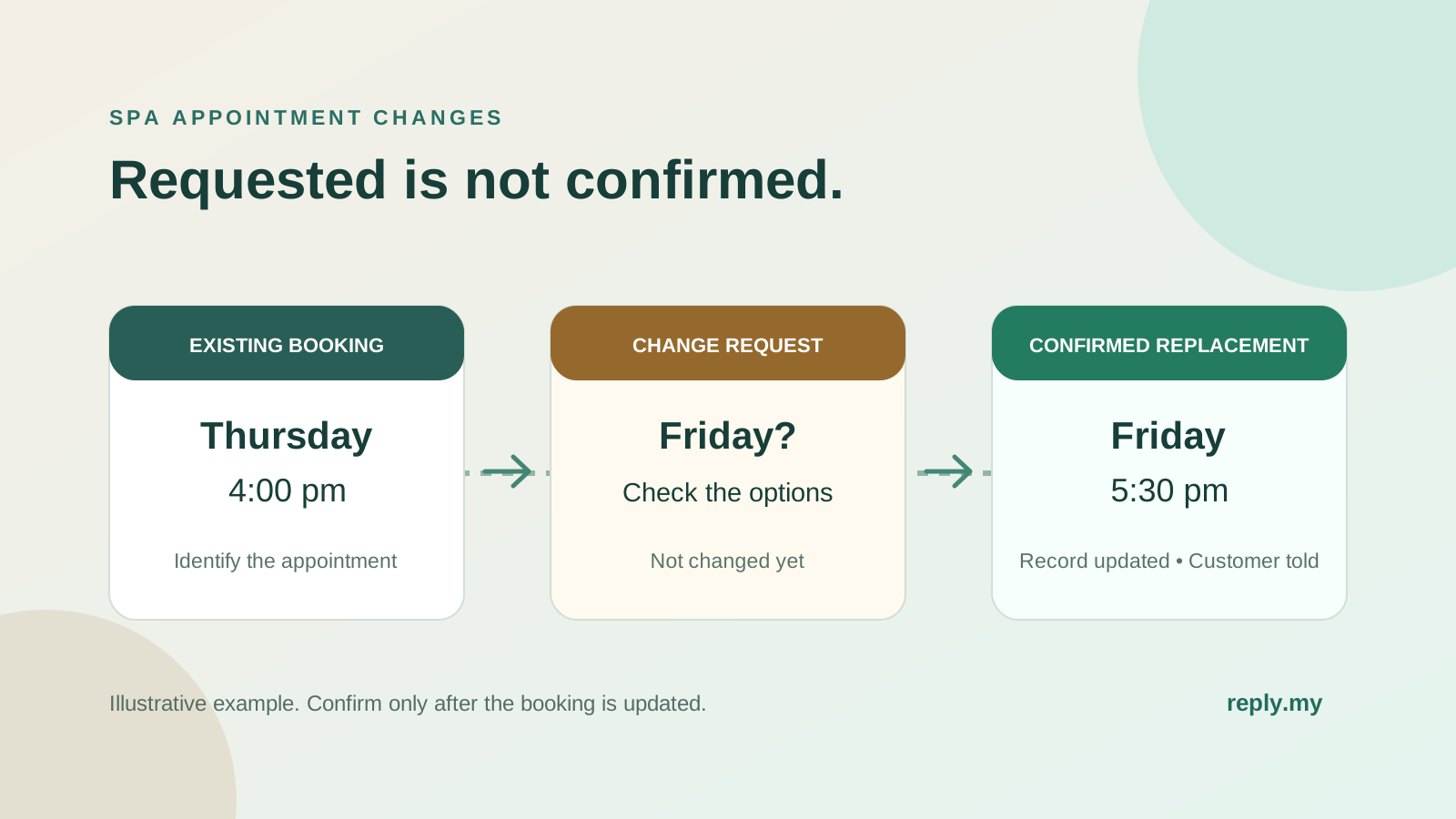
A rescheduling request asks for a change. A confirmed reschedule means the booking has actually been updated and the customer has been told the final details. Between those two points, availability, service duration, branch arrangements or existing booking terms may still need checking.
“We received your request” and “Your appointment has moved” are not interchangeable.
This is also different from a new booking enquiry. You already have an appointment to account for. Creating a second request without resolving the first can leave reception with two apparently active visits for the same customer.
The aim is a single, understandable outcome: an agreed replacement, the original appointment retained, or a clearly handled cancellation under your business’s actual policy.
Where does your current process become unclear?
Review a few recent appointment changes. Look for these observable problems:
- Customers ask whether they should still attend the original time.
- Employees say “done” before checking the booking record.
- A reminder refers to an appointment that staff believe has moved.
- A customer contacts another branch because the first request has no clear answer.
- Staff can see the preferred new time but not the original appointment.
- Two employees offer different alternatives without seeing the customer’s latest reply.
If changes are infrequent, clearer wording and one maintained appointment record may solve much of this. AI is not essential for a team that can handle requests reliably with its existing tools.
Automation becomes worth assessing when repeated questions and incomplete messages regularly interrupt reception. Even then, it should support a clear process rather than obscure an uncertain booking status.
Start by identifying the appointment—not collecting the whole customer profile
Before discussing replacements, establish which booking the customer wants to change. Ask for only the details your approved verification process needs, such as the booked branch, appointment date and booking reference.
Do not infer the appointment from a display name alone. Someone might be asking about a visit booked for a partner, a gift recipient or a second family member.
Then clarify the requested change. Moving the time is different from changing the branch, service or number of guests. A longer service may need a different appointment length. A couple’s request may need availability for both guests together.
The customer should not have to repeat these details when an employee takes over. Equally, a public comment thread is not the place to confirm someone’s private appointment information. Move the conversation to your appropriate private support route before discussing booking details.
A fictional change request, from first message to final answer
The following dialogue uses invented appointments and branches. It illustrates clear communication, not a Reply.my customer result, live availability or an actual business policy.
Imagine a customer booked for Thursday at 4 pm at the PJ branch. They ask to move the visit to Friday after 5 pm.
Customer: “Can I move tomorrow’s appointment to Friday evening?”
Reception: “I can help check that. Which branch and booking reference is this for?”
After completing the business’s required verification, the employee finds the appointment.
Reception: “I’ve found your Thursday 4 pm appointment at PJ. You’d prefer Friday after 5 pm. I’m checking the options; the booking has not been changed yet.”
That last sentence explains the current status. It does not assume the customer still intends to attend Thursday.
Customer: “Thanks. I definitely cannot come on Thursday.”
This matters. The team now needs to handle the original appointment according to its policy, even if Friday is unavailable. Silence about the original time would leave an important part of the request unresolved.
Reception: “Understood. I’ll check the change options and explain how we can handle the original appointment before confirming anything.”
Later, the employee verifies a Friday 5:30 pm option and explains any applicable terms before asking the customer to agree. Only after the customer accepts and the booking record is successfully updated should the final reply say:
Reception: “Your appointment has moved to Friday at 5:30 pm at PJ for the same service. The Thursday 4 pm appointment has been replaced.”
A specific confirmation closes the loop. “All sorted” does not give the customer enough information to spot an incorrect date, branch or service.
Four short replies your team can adapt
Use these examples only when the stated status is accurate. They are wording patterns, not a substitute for your booking process.
| Situation | Clear wording |
|---|---|
| Request received, not yet checked | “We’ve received your request to change the appointment. No change is confirmed yet; reception will check the options.” |
| Preferred time unavailable | “That time is unavailable. Would you like us to check a later time that day, or a different date?” |
| Customer cannot attend the original appointment | “Thanks for clarifying. We need to resolve the original booking as well as check a replacement. Reception will explain the options under your booking terms.” |
| Record successfully updated | “Your appointment has been changed to the date, time and branch shown below. The original appointment has been replaced.” |
Add the verified appointment details to a final confirmation. Avoid fixed promises such as “We’ll confirm in five minutes” unless your team can genuinely meet them.
Where Reply.my can help—and what needs separate verification
If your front desk spends each day searching different chats for appointment details, asking customers to repeat their preferences and passing requests between colleagues, the problem is more than how a reply is worded. The work is spread across too many conversations. For a chain, each extra handover can make it harder to see what the customer actually requested.
Reply.my can help collect the change request and relevant details, then pass the conversation to staff to continue. The practical aim is less repeated questioning and a clearer next action for reception—not simply a faster greeting. Whether the appointment itself can be changed automatically depends on a verified connection to your booking system.
Reply.my’s spa service describes business-approved answers, appointment-request collection and staff involvement. Those capabilities can be relevant to the conversation around a change: explaining the process, collecting the requested preference and helping reception continue with useful context.
They are not, by themselves, evidence that Reply.my can modify your existing booking calendar, cancel an appointment, transfer a deposit or stop a reminder. Confirm each required action against the proposed setup and the systems your business uses.
That distinction lets you choose a sensible scope. A business might need help collecting complete requests while keeping calendar changes with reception. Another might assess a verified booking-system connection. Do not treat those as the same purchase.
Customers may request changes through WhatsApp, Instagram, Messenger or another channel your team supports. Wherever they arrive, the confirmed booking record must be the reference for the final answer. Connecting inboxes does not automatically connect the calendar or identify the same customer across accounts.
Our broader AI chatbot guide for Malaysian businesses explains how to separate conversation assistance from actions that require a verified system connection.
Check whether customers understand the outcome
After making improvements, look beyond the number of requests acknowledged. Review whether the customer received an accurate final answer and whether the booking record agrees with it.
Useful measures include the proportion of change requests with a clear outcome, repeat questions about whether a change is confirmed, and reminders sent with outdated details. Compare similar periods and note differences in workload or staffing.
Do not promise that clearer messages will eliminate no-shows. People miss appointments for many reasons. The narrower, observable goal is to remove avoidable uncertainty about the appointment your business expects them to attend.
Frequently asked questions
Should we cancel the original appointment as soon as someone asks to reschedule?
Not automatically. Clarify whether the customer can still attend and follow the actual booking terms. The original appointment must have an explicit outcome; it should not disappear merely because a different time was requested.
Can an AI chatbot confirm the new time immediately?
Only if a verified workflow has successfully completed the booking change and can report the correct result. Without that connection, it should collect the request and make clear that staff confirmation is still needed.
What if the customer messages through two apps?
Verify which booking both conversations concern before treating them as one request. Staff should coordinate the final response so the customer does not receive competing options or confirmations.
Can we move a booking to another branch?
That depends on the service, availability and applicable booking or package terms. A nearby branch is not automatically an equivalent option. Confirm the customer’s preference and the receiving outlet’s ability to fulfil it.
What if a reminder has already been sent for the old time?
Once the change is verified, send a clear correction with the current appointment details. Review the reminder process separately; changing a conversation status may not update scheduled messages in another system.
Make the final answer unmistakable
A well-handled reschedule should not leave the customer working out which message is the latest or whether an offered time is actually theirs.
Start with one recurring confusion—an ambiguous acknowledgement, a missing original booking or an outdated reminder. Resolve that gap before adding more automation.
Want to understand which appointment conversations could be handled automatically? Discuss your appointment workflow with Reply.my. Tell us how many branches you run, which messaging channels customers use and which booking system you have. We can discuss where conversation assistance may help and which actions should remain with your team.